
ZOR77 Deposit and Withdrawal – JazzCash, Easypaisa and Bank Guide
ZOR77 provides several payment options for users who want to manage deposits and withdrawals through the platform. Depending on the options currently available in your account, these may include JazzCash, Easypaisa, and bank accounts. This guide explains how ZOR77 deposit and withdrawal work, what to check before making a transaction, and what to do if a payment is delayed or doesn’t appear in your account.
How to Deposit Money on ZOR77
Before depositing, open your account and check which payment methods are currently available.
Step-by-Step Deposit Process
- Log in to your account.
- Open the Wallet or Deposit section.
- Select an available payment method.
- Choose JazzCash, Easypaisa, or bank transfer, where available.
- Enter the required payment details.
- Enter the amount you want to deposit.
- Follow the payment instructions displayed by ZOR77.
- Confirm the transaction through your selected payment method.
After completing the payment, return to your account and check your wallet balance or transaction history.
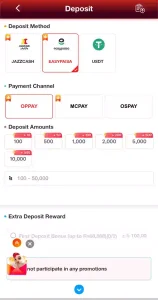
Before Making a Deposit
Check the payment details carefully before confirming the transaction. Follow the instructions shown in your ZOR77 account, not payment information from an unknown person or website. Never share your JazzCash PIN, Easypaisa PIN, OTP, password, or other confidential security information.
ZOR77 Payment Methods
The payment options currently available on this game may include:
JazzCash
JazzCash is one of the local payment methods available to users. When it appears as an option in your account, follow the payment instructions shown on the deposit or withdrawal page. Check the destination details carefully before confirming a transaction.
Easypaisa
Easypaisa is another local payment option that may be available on the game. Select Easypaisa from the available payment methods and follow the current instructions shown by the platform.
Bank Account
Bank payment options may also be available for eligible users. The exact process and required information can vary, so use the details displayed in your ZOR77 account. Payment methods can change over time. Always check the options currently shown in your account before making a transaction.
Withdrawal Process
To withdraw funds, use the withdrawal section of your account.
Step-by-Step Withdrawal
- Log in to your account.
- Open the Wallet section.
- Select Withdraw.
- Choose an available withdrawal method.
- Enter the required account information.
- Enter the amount you want to withdraw.
- Review the information carefully.
- Submit the withdrawal request.
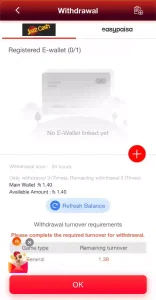
After submitting the request, check the withdrawal status in your account. The available withdrawal methods and requirements can vary by account and payment method.
ZOR77 Withdrawal Requirements
Before requesting a withdrawal, check whether your account has any outstanding requirements. Depending on the transaction or promotion, these may include:
- Account or identity verification.
- Minimum withdrawal amount.
- Betting or wagering requirements.
- Ledger requirements.
- Correct payment details.
- Other promotional conditions.
A bonus does not automatically become withdrawable simply because it has been added to your account. Always read the specific promotion terms before making a withdrawal request.
ZOR77 Betting and Ledger Requirements
Some promotions include a betting requirement. For example, the current first-deposit promotion covered in our ZOR77 Bonus Guide includes a 10X betting requirement.
Other promotions may have different conditions. Check the promotion attached to your account rather than assuming that one requirement applies to every bonus. Ledger or betting requirements may also affect whether we can process a withdrawal. Check your account status before submitting a request.
How Long Does a ZOR77 Withdrawal Take?
No single processing time applies to every withdrawal. The time can depend on the payment method, account status, verification requirements, and platform processing. For this reason, check the withdrawal information shown in your ZOR77 account before submitting a request.
Withdrawal Pending
A withdrawal may remain pending while the platform processes the request or checks the account.
If your withdrawal is pending:
- Check the withdrawal status in your account.
- Review any verification or betting requirements.
- Confirm that the payment details are correct.
- Keep your transaction information.
- Contact customer support if the request remains pending beyond the timeframe shown by the platform.
Do not submit repeated withdrawal requests unless the platform instructs you to.
ZOR77 Deposit Not Showing
If a completed deposit does not appear in your wallet, first check the transaction details and account balance.
Make sure:
- The payment was completed successfully.
- The account details were correct.
- The transaction is not still processing.
- You have kept the payment record.
If the amount remains missing, contact support and provide the relevant transaction information. Never share your password, OTP, or payment PIN with anyone claiming they can fix the problem.
Withdrawal Canceled
A withdrawal may be canceled because of an account issue, incorrect information, verification requirements, or other platform rules. Check the withdrawal status and the reason shown in your account before trying again. If the reason is unclear, contact customer support through the platform’s current support channel.
ZOR77 Minimum Deposit and Withdrawal
Minimum deposit and withdrawal amounts vary by payment method and current platform rules. Instead of relying on an old figure from another website, check the amount shown in your account before making a transaction. This matters because payment rules and limits can change over time.
How to Stay Safe When Making Payments
Money-related transactions require extra care. Use these simple precautions:
Check the payment details:
Make sure the destination information matches the instructions shown in your account.
Protect your PIN and OTP:
Never share security codes with another person.
Avoid personal payment requests:
Be cautious if someone asks you to send money to a personal JazzCash, Easypaisa, or bank account outside the normal platform process.
Keep transaction records:
Save important payment information until the transaction is complete.
Use a trusted source:
Make sure you are logged in through a valid source you have verified before entering account or payment information.
ZOR77 Deposit & Withdrawal Problems at a Glance
| Problem | What to Check |
|---|---|
| Deposit not showing | Check the payment status, account balance, and transaction details. |
| Withdrawal pending | Check processing status and any verification or betting requirements. |
| Withdrawal cancelled | Review the reason shown in your account and correct any issue before trying again. |
| Payment method unavailable | Check which methods are currently available in your account. |
| Incorrect payment details | Recheck the information before submitting another transaction. |
| Transaction still processing | Wait for the platform’s stated processing period before contacting support. |
Final Thoughts
ZOR77 deposits and withdrawals are managed through the payment options available in your account, which may include JazzCash, Easypaisa, and bank payments.
Always check the current payment instructions, minimum limits, verification rules, and any betting or ledger requirements before making a transaction. Keep your payment information private, and contact customer support if you can’t resolve a genuine transaction issue through the normal account options.
For the complete platform guide, see our ZOR77 Game Download APK guide. For current promotions and requirements, visit our ZOR77 Bonus and Rewards guide.