
ZOR77 Login – How to Log In, Reset Password, and Fix Problems
Logging in to ZOR77 is usually simple once you’ve registered your account. After you sign in, you can access games, your wallet, rewards, account settings, and other platform features. This guide explains how to log in, what to do if you forget your password, how to handle OTP issues, and how to keep your account information safe.
How to Log In to ZOR77
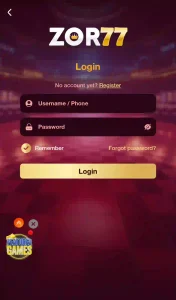
Follow these steps to access your account:
- Open the ZOR77 app on your Android phone.
- Tap login on the main screen.
- Enter your registered username and password.
- Review the details carefully before submitting.
- Tap login to access your account.
Once you log in successfully, you can open the game lobby and use the account, wallet, rewards, and other available sections.
Quick Tip
Make sure you are using the correct login details. Repeatedly entering the wrong password may cause temporary access problems.
ZOR77 Login With Your Registered Account
You need an existing account to log in. If you have not registered yet, complete the registration process first. During registration, use a phone number or email address that you can access. Keep your username and password in a safe place, and never share them with another person.
Read our ZOR77 Registration Guide for the full account-creation process.
What to Do If You Forget Your ZOR77 Password
Forgetting a password is a common account problem. If the login page offers a Forgot Password option, use it to start recovery.
Password Recovery Steps
- Open the login page.
- Tap Forgot Password.
- Enter the information the platform requests.
- Complete the verification step or OTP process.
- Create a new password.
- Return to the login page and sign in with the new password.
Recovery options can vary by platform version, so follow the instructions on your screen.
ZOR77 OTP Not Received
Sometimes the verification code may be delayed. Before requesting another code, check that the phone number or email address you entered is correct.
You can also:
- Check your mobile signal or internet connection.
- Wait briefly for the message to arrive.
- Check your messages or email carefully.
- Request another OTP if the option is available.
Never share your OTP with anyone, even if they claim to be from the support team.
ZOR77 Login Not Working
If your ZOR77 login is not working, start with the simple checks below.
Check Your Username and Password
Make sure you haven’t made any typos. Passwords are often case-sensitive, so check uppercase and lowercase letters carefully.
Check Your Internet Connection
It requires an internet connection. Try switching between Wi-Fi and mobile data if the page does not load correctly.
Update or Reinstall the App
If the login problem started after an application update or installation, check whether you are using the current APK version. If necessary, download the APK again from a trusted source and reinstall it.
Clear Temporary App Data
If your Android phone allows it, clearing the app cache can sometimes help when an application becomes unresponsive. Do not clear account data unless you understand what it will remove from your device.
ZOR77 Login Error After Changing Your Password
After resetting your password, use the new password instead of an older saved one. If your browser or password manager automatically fills the old password, remove the old saved entry and enter the new credentials manually.
Is ZOR77 Login Safe?
Account security depends partly on how you handle your login information.
For safer account use:
- Use a strong and unique password.
- Never share your OTP or password.
- Avoid entering your details on unfamiliar websites.
- Check the website address before signing in.
- Avoid modified or suspicious APK files.
- Log out when using a shared device.
Be especially careful with links sent through social media, messaging apps, or unknown websites. A fake login page may look similar to the real platform but can be designed to collect account information.
What If Your Account Is Locked?
If you cannot access your account after checking your login details, look for the recovery or support option available on the platform. Keep any relevant account or transaction information available when contacting support. However, never send your password, OTP, wallet PIN, or payment PIN to anyone.
ZOR77 Login and Account Security Tips
A few simple habits can reduce the risk of account problems:
- Use a unique password: Avoid using the same password for your email, banking, and gaming accounts.
- Protect your OTP: Treat OTP codes as private security information.
- Check the URL: Before entering your details, make sure you are on the correct website or app.
- Avoid public devices: Do not save your login details on shared computers or phones.
- Download carefully: Use a trusted source for the APK and avoid modified versions.
ZOR77 Login Problems at a Glance
| Problem | What to Try |
|---|---|
| Wrong username or password | Recheck your login details and try again. |
| Forgot password | Use the Forgot Password option if available. |
| OTP not received | Check your contact details, signal, and connection, then request another OTP if available. |
| Login page not loading | Check your internet connection and try again. |
| App keeps crashing | Restart the app, check storage, and make sure you are using a compatible version. |
| Account access is restricted | Use the platform’s current recovery or support option. |
When to Contact Customer Support
Contact customer support when you cannot resolve an account problem through the normal login or recovery options. For payment-related issues, keep your transaction details available because support may need them to identify the problem. Remember that legitimate support should not require you to share your password, OTP, or payment PIN.
Final Thoughts on ZOR77 Login
The ZOR77 login process is straightforward when you have the correct account details and a working internet connection. Common problems include incorrect credentials, OTP delays, connection issues, or password recovery.
If you cannot log in, start with the simplest checks before trying more complicated solutions. Most importantly, keep your account information private and enter it only on an official source you have verified.
For the full platform guide, including APK installation, games, bonuses, payment methods, and safety information, see our ZOR77 Game Download APK guide.