
ZOR77 Registration – How to Create a New Account
ZOR77 registration is the first step to accessing the platform’s games, wallet, bonuses, and other features. The registration process is generally straightforward and can be completed from the app.
This guide explains how to register a new ZOR77 account, complete OTP verification, choose your login details, and handle common registration problems.
How to Register on ZOR77 Game
Follow these steps to create your account:
- Open the app on your Android phone.
- Tap Register on the main screen.
- Enter the required phone number or email address.
- Enter the OTP sent to your registered contact method.
- Create your username and password.
- Complete the registration process.
Once registration is complete, you can use your login details to access your ZOR77 account.
Step-by-Step ZOR77 Registration
Step 1: Open the ZOR77 App
Launch the app after installing the APK. On the main screen, tap Register. Tap it to begin creating a new account.
Step 2: Enter Your Contact Details
Enter the phone number or email address the platform requests. Use details you can access, as you may need them for OTP verification or future account recovery. Check the information carefully before continuing.
Step 3: Complete OTP Verification
ZOR77 may send a verification code to your registered phone number or email address. Enter the OTP in the required field to complete verification. Never share an OTP with another person. Treat it as private account-security information.
Step 4: Create Your Login Details
Choose a username and create a strong password for your new account. Avoid using simple passwords or information that others can easily guess. It is also best to use a password you don’t use for important accounts such as email or banking.
Step 5: Complete Registration
After entering the required information and completing verification, submit the registration form. Your account should then be ready to use.
What Do You Need for ZOR77 Registration?
The exact registration fields can vary by platform version. In general, you may need:
- An active phone number or email address.
- An OTP for verification.
- A username.
- A secure password.
- A working internet connection.
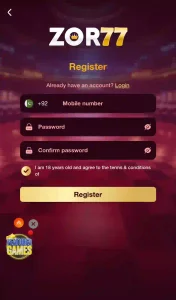
Provide only the information the platform’s current registration form requests.
ZOR77 Registration Problems and Solutions
Sometimes users may have trouble creating an account. Here are some common problems and simple things to check.
| Problem | Possible Cause | Solution |
|---|---|---|
| OTP not received | Network or delivery delay | Check your signal or connection, wait briefly, and request another OTP if available. |
| Registration page not loading | Internet connection problem | Check your connection and try again. |
| Registration fails | Incorrect or incomplete information | Recheck the details you entered and complete all required fields. |
| Phone number or email rejected | Incorrect format or previously used details | Check the information carefully and follow the format the platform requests. |
| Password rejected | Password does not meet the platform’s requirements | Create a stronger password using a combination of letters, numbers, and symbols. |
| App closes during registration | Temporary app or device issue | Restart the app, check available storage, and try again. |
Tips for Creating a Secure ZOR77 Account
A few simple steps can help protect your new account.
Use a strong password:
Choose a password that is hard to guess, and avoid reusing an important password from another service.
Protect your OTP:
Never share your verification code with anyone.
Use your own contact details:
Register with a phone number or email address that you can access.
Check the source:
Before entering personal information, make sure you are using a ZOR77 source you have verified.
Keep your credentials private:
Don’t share your username, password, or payment security information with others.
Can I Create More Than One ZOR77 Account?
Account rules can vary, so check the current terms before creating another account. Using multiple accounts without permission may cause account or reward-related problems if it goes against the platform’s current rules.
What Should I Do After ZOR77 Registration?
After you complete registration, log in with your new credentials. You can then access the available game lobby, account section, wallet, promotions, and other features.
Before making a deposit, take time to understand the platform’s payment and promotion rules.
For the next step, see our ZOR77 Login Guide for help accessing your account.
You can also read our complete ZOR77 Game Download APK guide for installation steps, available games, bonuses, payment methods, safety information, and common problems.
Final Thoughts
ZOR77 registration is simple if you have the required contact details and a working internet connection. The main steps are entering your information, completing OTP verification, and creating secure login credentials.
Take care when entering personal information, and never share your OTP or password. Once you create your account, check the current platform rules before using the wallet, promotions, or real-money gaming features.